Neural Amp Modeler (NAM)
Neural Amp Modeler captures the behaviour of a real amplifier or pedal by training a neural network on how it responds to a known signal. The result is a .nam file that sounds like the thing it was trained on, including how it breaks up as you dig in. Thousands of community captures are free to download, and you can make your own on the device.
What your hardware can run
NAM is the most CPU-hungry thing on the device.
NAM models are trained at a range of architecture sizes, and a lighter architecture costs a fraction of a heavier one to run while giving up some fidelity — especially in how the high end and the edge of breakup are reproduced. My observations have been as follows, when run without other plugins taking CPU:
| Hardware | Low-quality | High-quality |
|---|---|---|
| v3 (Pi 5) | 8 simultaneously, no issue | Three, maybe four |
| v2 (Pi 3/4) | Up to four | Not successfully |
These are whole-device budgets, not per-chain ones: treat the numbers as a ceiling to stay well under, rather than a target. The practical consequence is that on v2, NAM introduces a cost you must spend deliberately. One amp capture, plus conventional plugins for everything else, will go further than four captures in a row.
If audio starts dropping out, you've run out of CPU. Performance covers reading XRUN counts and raising the JACK period to buy headroom.
Sample rate
NAM models are trained at a fixed sample rate, and 48 kHz is the standard. The pi-Stomp runs at 48 kHz, so community models load and run at the rate they were trained at with nothing to configure.
Capture enforces this. If JACK is running at any other rate, the capture refuses to start rather than producing a file that trains into a subtly wrong model.
Loading NAM models
pi-Stomp ships with the NAM LV2 plugin pre-installed. Models are .nam files placed in /home/pistomp/data/user-files/. Upload them via MOD-UI's file manager or SCP:
scp my-amp.nam pistomp@pistomp.local:/home/pistomp/data/user-files/
Once uploaded, the NAM plugin appears in MOD-UI's plugin browser. Drag it onto your pedalboard and select the model file from the plugin's parameter list.
The NAM plugin tile on the LCD uses a distinctive tri-color border (red, yellow, blue) and shows the model filename as a subtitle.
Capturing your own models
pi-Stomp v3.2.0 adds a NAM Capture panel accessible from the System Menu. This lets you record a reamp sweep of your amplifier or pedal and train a NAM model.
What you need
- An amplifier or pedal you want to profile
- A cable from a pi-Stomp output to the amp or pedal input
You don't need to plug an instrument in — the capture drives the standardized reamp signal itself. That file (T3K-sweep-v3.wav) ships with the OS image, so there's nothing to download.
The pi-Stomp's output is capable enough to drive an amp or pedal front-end directly; use the Input Gain control to match the send level to what a guitar would deliver. A reamp box (which attenuates line level to instrument level and raises the source impedance) gives a cleaner, more standardized match, but it isn't required — full-rig and pedal captures work fine without one. You would only need to add preamp gain instead if you were capturing a bare power-amp / FX-return input, which expects line level.
Capture workflow
- Connect pi-Stomp Out 2 to your amp or pedal input (directly, or through a reamp box)
- Connect a microphone or load box from your amp back to pi-Stomp In 2
- Open the System Menu and select NAM Capture
Out 1 plays back the wet signal coming from the captured pedal or amp, so you can monitor the capture. If you don't want to hear it, leave Out 1 disconnected during the capture.
The capture panel shows the setup view:
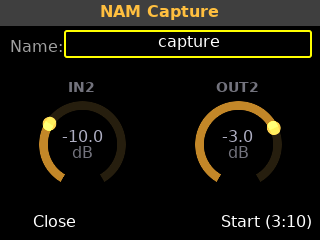
- Name — name your capture (appears as the filename)
- Input Gain — adjust the level of the returning signal at In 2 (Tweak 1)
- Headphone Vol — adjust monitoring volume (Tweak 2)
- Start — begins the capture
During capture
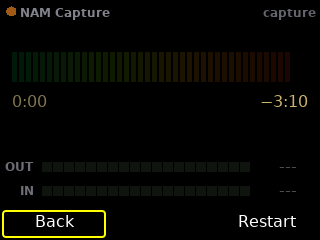
The panel switches to the capture view with a progress bar, elapsed time, and live input/output meters:
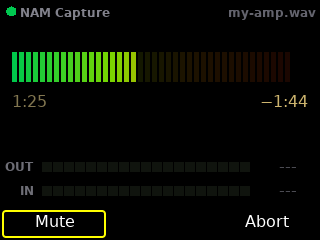
The sweep takes about 3 minutes. Play nothing during the sweep — the reamp signal does the work. The meters show:
- OUT — the level being sent to your amp
- IN — the level coming back from your microphone or load box
If the input clips (red), the capture will fail. Reduce your amp's volume or adjust the microphone position.
After capture
Success:
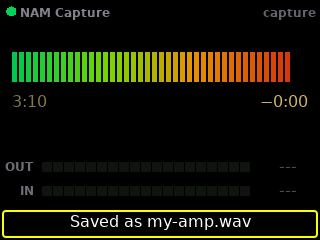
The captured WAV file is saved to /home/pistomp/data/user-files/Audio Recordings/. Transfer it to a computer and train it using the NAM trainer or the Tone3000 capture page.
Failure:
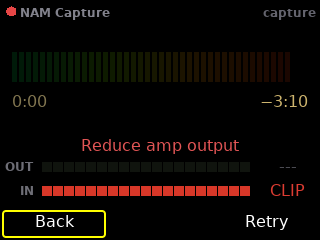
The panel shows the error message and freezes the meters for diagnosis. Common causes:
- Input signal too hot (clipping)
- No signal from the amp (check connections)
- Sweep file not found (old image?)
Aborted:
You can abort at any time during capture.
Free NAM resources
- Tone3000 — thousands of free NAM models of amps, cabs, and pedals. Also provides the capture page for training your own models.
- Tone3000 Capture — upload your sweep WAV and train a NAM model in your browser (uses Google Colab).
- Neural Amp Modeler — the original NAM project by Steven Atkinson. Open-source model training. The LV2 plugin and much of the surrounding tooling are maintained by Mike Oliphant.
- Tone Junkie — commercial and free NAM model packs.
- NAM Discord — community for sharing models and troubleshooting captures.
Reamping references
Background on levels and impedance when driving an amp or pedal from a line output: