Recovery
The recovery system is how your pi-Stomp stays up to date. It checks for and installs new versions of the pi-Stomp software, plugins, and system packages. It also activates automatically if something crashes, giving you diagnostic tools and a way back to a working state.
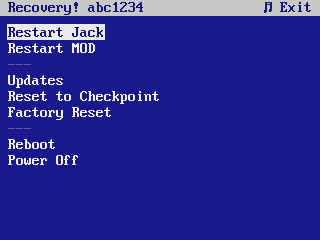
You can launch recovery at any time from the System Menu → Updates and Recovery >. The row only appears when a recovery install is present; if you don't see it, recovery isn't installed on that device.
Updates
This is what you'll use recovery for most. pi-Stomp ships updates over the air from the Tree Fall Sound repository. When you open the Updates menu, it checks what's available and lets you choose what to install.
What gets updated
| What | What changes |
|---|---|
| pi-Stomp software | New features, bug fixes, LCD improvements, new plugin panels. This is the main controller — the thing that reads your footswitches and drives the screen. |
| mod-host | The engine that runs your plugins. Updates improve stability and compatibility. |
| mod-ui | The web interface at pistomp.local. Updates add new plugin browser features and fix bugs. |
| JACK audio | The audio server. Updates only when there's a stability fix. |
| System packages | Supporting libraries and tools. These update quietly in the background. |
Updates are cumulative — you don't need to install them in order. Just run Updates whenever you feel like it, or when you're troubleshooting something.
How updates work
Updates need an internet connection. Recovery checks connectivity first; if the pi-Stomp is offline, the Updates menu shows No internet instead of a package list. While it refreshes the package database, the live apt output scrolls on screen and you can cancel at any time.
When you select Updates, recovery shows you what's available and lets you pick individual packages or install everything at once. During installation, a progress bar shows what's happening:
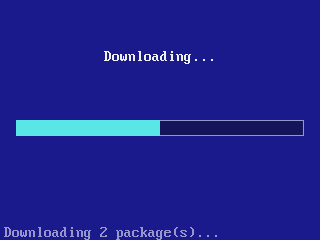
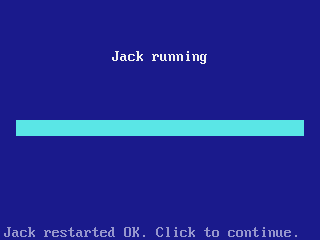
If a package fails to install, recovery automatically restores the previous version from its cached copy before anything is restarted. After a successful install, it restarts only the services affected by the packages you updated.
Unverified packages
If installed package files no longer match what the system recorded (a dpkg --verify mismatch — e.g. a file was edited or corrupted), the recovery main menu shows an N package(s) unverified entry. Open it to see which packages are affected; reinstalling or updating them restores the recorded files.
Crash screen
If a critical service crashes, recovery takes over the LCD automatically. This happens when mod-ala-pi-stomp or mod-ui fails 3 times within 60 seconds.
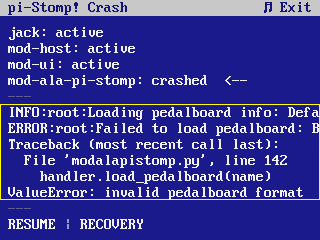
The crash screen shows:
- Service states — each service in the chain with its current status. The failed service is marked with a
<--indicator - Log textarea — the last 6 lines of the crash log
- RESUME — returns to normal operation
- RECOVERY — opens the recovery menu
Navigating the crash screen
- Navigation encoder — move between the header, service rows, log textarea, and action buttons
- Tweak 1 — when the log textarea is selected, scrolls the log text horizontally (long log lines that don't fit the screen)
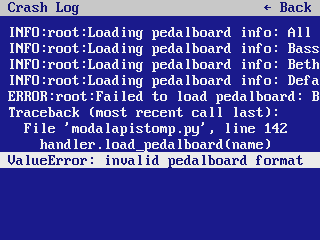
- Click on the log textarea — opens the fullscreen log viewer
- Click RESUME — releases the LCD and restarts the main app
- Click RECOVERY — opens the recovery menu
Fullscreen log viewer
The log viewer shows the complete journalctl output for the crashed service. Use the Navigation encoder to scroll through lines vertically. Use Tweak 1 to scroll long lines horizontally. Long-press or click the back icon to return to the crash screen.
Restarting services
- Restart Jack — restarts the JACK audio server. Use this if audio stops working but the LCD is still responsive.
- Restart MOD — restarts mod-host. Use this if plugins stop loading.
Rolling back to a known-good state
pi-Stomp tracks changes in six domains:
| Domain | What it covers |
|---|---|
| Pedalboards | All your pedalboard bundles |
| Plugins | User-installed LV2 plugins |
| Config | default_config.yml, settings.yml, config.py |
| Audio | /etc/default/jack and ALSA mixer state (/var/lib/alsa/asound.state) |
| Boot | /boot/config.txt, /boot/cmdline.txt, /boot/pistomp.conf |
| System | System packages (pi-stomp, mod-host, jack, etc.) |
There are two kinds of reference point:
- Checkpoint — a snapshot of the current state that you can return to. Create one manually before an experiment you might want to undo.
- Factory — the original state as shipped with the OS image. The fallback if everything goes wrong.
Not every domain has both. Pedalboards, Config, and Boot keep checkpoints; Plugins, Audio, and System can only go back to factory:
| Domain | Checkpoint | Factory |
|---|---|---|
| Pedalboards | yes | yes |
| Config | yes | yes |
| Boot | yes | yes |
| Plugins | — | yes |
| Audio | — | yes |
| System | — | yes |
Audio is the deliberate omission: pi-Stomp rewrites the ALSA mixer state every time you move a volume or EQ control, so a checkpoint of it would almost never be the state you wanted back.
Reset to Checkpoint reverts one or more domains to their last known-good state. Useful if an experiment went wrong.
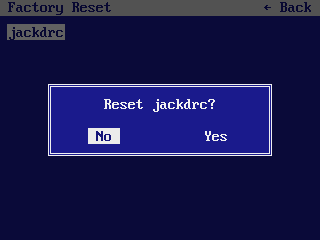
Factory Reset reverts one or more domains to their factory state. This wipes user data in the selected domains and restores the originals from the OS image. For plugins, this re-downloads the factory plugin archive.
Both operations let you pick which domains to reset. You can reset just your pedalboards while keeping your config, or reset everything at once. In the recovery picker, Audio and Pedalboards don't appear in the list — they have their own entries on the main menu.
System actions
- Reboot — reboots the pi-Stomp
- Power Off — shuts down cleanly
Getting help
If you encounter a crash that you can't resolve:
- SSH into the pi-Stomp and get the full traceback:
sudo journalctl -u mod-ala-pi-stomp -n 100 --no-pager
- Open an issue on the relevant repository:
- pi-stomp issues — for crashes in the main controller software
- pistomp-recovery issues — for crashes in the recovery system itself
- pi-gen-pistomp issues — for OS image and package issues
Include the full log output and a description of what you were doing when the crash occurred.
Manual recovery
You can also recover without the LCD by SSHing in:
sudo systemctl restart jack
sudo systemctl restart mod-host
sudo systemctl restart mod-ui
sudo systemctl restart mod-ala-pi-stomp
Check service status:
sudo systemctl status mod-ala-pi-stomp
sudo journalctl -u mod-ala-pi-stomp -f